
Pixel Diff vs Perceptual Diff: Why NVIDIA ꟻLIP Catches What Others Miss
Most tools default to pixel diff. It is simple, fast, and noisy at scale. Perceptual comparison asks a better question: would a human notice?
Most visual regression testing tools default to pixel diff. It is simple to implement, fast to run, and produces an exact answer: these pixels changed, these didn't.
That exactness is also its weakness. At scale, pixel diff flags a stream of differences that no human would ever notice, and the differences that matter get lost in the noise.
The Problem with Pixel Diff
Pixel diff compares two images by checking whether each pixel in image A matches the corresponding pixel in image B. Any mismatch is flagged as a difference.
That sounds precise, but in practice it is noisy, for a few reasons.
Sub-pixel Rendering
Fonts render differently across operating systems, GPU drivers, and even browser versions. The same character rendered by the same browser on two different platforms can differ by a few pixels around the glyph edges. These differences are invisible to the human eye, but a pixel diff flags every one of them.
Anti-aliasing Variations
Curved edges, diagonal lines, and rounded corners produce anti-aliasing patterns that vary with the rendering engine. A button with border-radius: 8px can generate different anti-aliased edge pixels across environments, even when the visual result looks identical.
Compression Artifacts
If your screenshots pass through any lossy compression (JPEG, WebP), the resulting artifacts introduce pixel-level noise that has nothing to do with actual UI changes.
The False Positive Tax
Every false positive costs developer time. Someone has to look at the diff, determine it's not a real regression, and approve the baseline update. At scale, this creates "diff fatigue": developers start rubber-stamping approvals because most diffs are noise. That's exactly when real regressions slip through.
Perceptual Diff: Testing Like a Human
Perceptual diff algorithms model human vision: rather than checking whether pixels are identical, they estimate whether a human would notice the difference.
Human vision has specific, well-studied properties that make this possible:
- Spatial frequency sensitivity: We notice sharp edges and text changes more than gradual gradient shifts
- Color sensitivity: We perceive some color differences more than others
- Contrast masking: Differences in high-contrast areas are harder to see than the same differences in uniform areas
- Viewing distance: At typical screen viewing distances, differences below a certain angular size are imperceptible
A perceptual diff algorithm uses these properties to weight each pixel difference by its visual significance, producing a map of meaningful changes rather than any changes.
NVIDIA ꟻLIP: Purpose-Built for Rendered Content
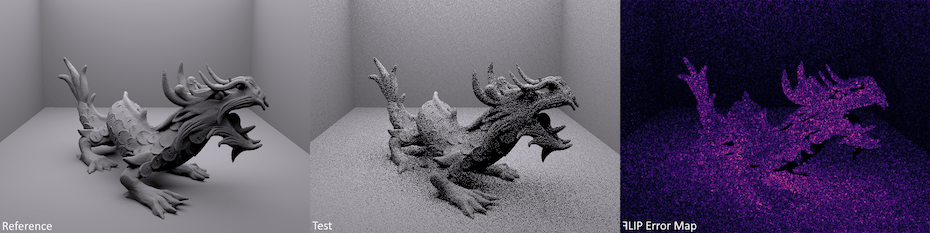
ꟻLIP was developed by NVIDIA Research (Andersson et al. 2020, "ꟻLIP: A Difference Evaluator for Alternating Images") specifically for evaluating differences in rendered images, the kind of comparison you do when flipping back and forth between two versions of the same frame. Unlike general-purpose perceptual metrics (SSIM, PSNR), ꟻLIP was designed for comparing computer-generated content at typical viewing distances.
How ꟻLIP Works
ꟻLIP processes image pairs through two parallel pipelines:
Color pipeline: Converts pixels to a perceptually uniform color space (Hunt-adjusted CIELAB), applies spatial filtering based on viewing distance and display resolution, then computes color differences weighted by human color sensitivity.
Feature pipeline: Detects edges and point features in both images, then computes a feature difference map that highlights structural changes (shifted edges, new elements, removed content).
The final ꟻLIP map combines both pipelines, producing a per-pixel score from 0 (imperceptible difference) to 1 (maximum perceptible difference).
Why ꟻLIP Beats General Metrics
| Metric | Designed For | Screen Content? | Perceptual Accuracy |
|---|---|---|---|
| Pixel diff | Exact comparison | No | Low |
| SSIM | Image quality assessment | Somewhat | Medium |
| PSNR | Signal processing | No | Low |
| ꟻLIP | Screen content comparison | Yes | High |
ꟻLIP's key advantage is that it was validated against human perception studies specifically for the type of content you see on screens: text, UI elements, sharp edges, and synthetic graphics. Other metrics were designed for photographic content and don't handle rendered UI as accurately.
Practical Impact
Consider a typical web application with 50 pages tested across 3 viewports. That's 150 screenshots per run.
With pixel diff, every rendering variation between CI runners (a font hinting difference, an anti-aliasing shift, a driver update) shows up as a changed screenshot. Someone has to open each one, stare at it, and conclude that nothing actually changed. Do this a few times and reviews stop being careful.
With ꟻLIP-based comparison, those rendering variations score below the perceptual threshold. Only changes that a human would actually notice get flagged. Review cycles get shorter because developers only look at meaningful changes, and a flagged diff is much more likely to be a real issue, so a clean run actually means clean UI.
When Pixel Diff Still Makes Sense
There are still cases where pixel diff is the right choice:
- You need exact verification (e.g., generated PDFs, print layouts)
- Your rendering environment is perfectly controlled (same OS, GPU, driver version)
- You're comparing images that shouldn't vary at all (e.g., static asset verification)
For everything else (web applications, cross-browser testing, CI environments with mixed runners, rendered game frames), perceptual diff with ꟻLIP produces more actionable results.
Using ꟻLIP in PixelEagle
PixelEagle integrates NVIDIA ꟻLIP as a first-class comparison mode alongside exact pixel comparison. Screenshots are hashed first, so identical images are matched for free; only screenshots that actually differ pay for a deeper comparison. You pick the evaluator per project: pixel-by-pixel for exact matching, or ꟻLIP for perceptual comparison. The diff view shows a heatmap of differences, so you can see exactly what changed and how significant the change is.
The default sensitivity settings are tuned for typical screen content, and each project can adjust tolerance and threshold to match its own noise floor. That is useful when your renderer has stochastic effects or your CI runners vary.
Key Takeaways
- Pixel diff generates false positives from rendering variations that are invisible to humans
- Perceptual diff algorithms model human vision to surface only meaningful changes
- NVIDIA ꟻLIP is purpose-built for rendered screen content and outperforms general metrics like SSIM
- Use pixel diff when you need exact matching in a controlled environment; use ꟻLIP for everything else